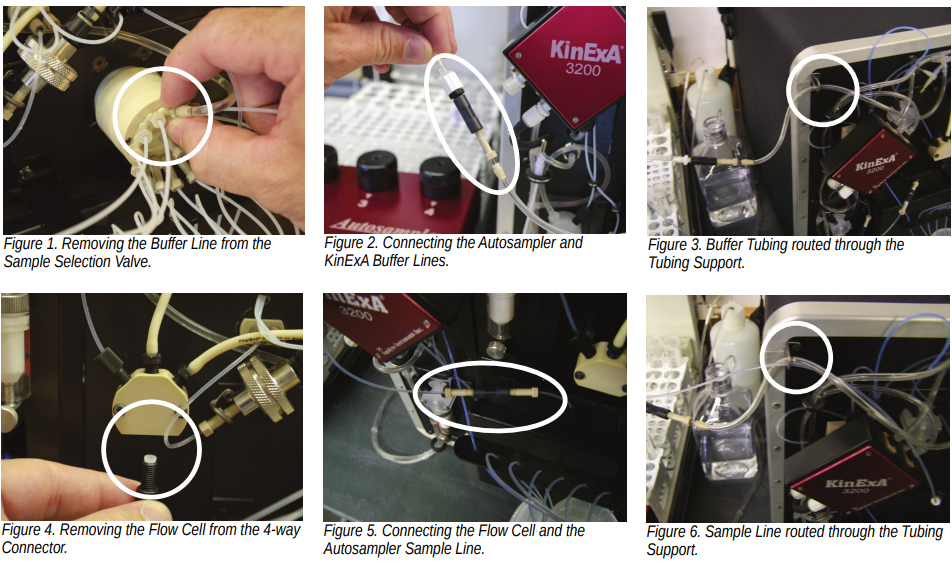
Use the following procedure for connecting the Autosampler to the KinExA® 3200:
Attach aUnionto theAutosampler Buffer Line, then remove theInstrument Buffer Linefrom Port 1 on theSample Selection Valve(Figure 1).
Connect theBuffer Linestogether via theUnion(Figure 2) and route the excessLinethrough the upper leftTubing Support(Figure 3).
Disconnect theFlow Cell Linefrom the bottom of the4-way Connector(Figure 4).
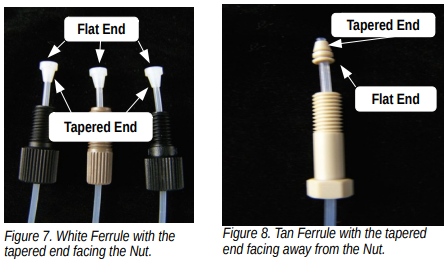
Remove theWhite Ferruleand1/4-28 Black Nutand add a10-32 Tan NutandTan Ferruleto the Line.
Connect theFlow CellandAutosampler Sample Linetogether through aUnion(Figure 5). Route theTubingthrough the upper leftTubing Supporton the KinExA (Figure 6).
NOTE:See Figures 7 & 8 for properFerruleinstallation.
Ferrule Installation Instructions
TheWhite Ferruleslides onto theTubingwith the tapered end toward theNutand the flared end toward theValve Port. TheTan Ferruleslides onto theTubingwith the tapered end toward the end of theTubingand the flat end toward theNut. When installing and tightening these fittings, be sure to push theTubingall of the way into theValve Ports(Figures 7 & 8).
KinExA® is a registered trademark of Sapidyne Instruments Inc.